
The models run local. So does the control.
A local model is fast and free, but raw: no interface, no memory of what it did, no guarantee about what it triggers. Morax AI adds the three layers a raw Ollama daemon doesn't have — a live view of the inference chain, a catalogue of reusable actions, and a human approval gate the moment an action would touch anything outside the machine.
Open Morax AI — indisponible. A release script exists in its repository, but no notarised build is published, and this hub has no access to the local one.
The only Ollama interface on the machine — a second one is deliberately not written.

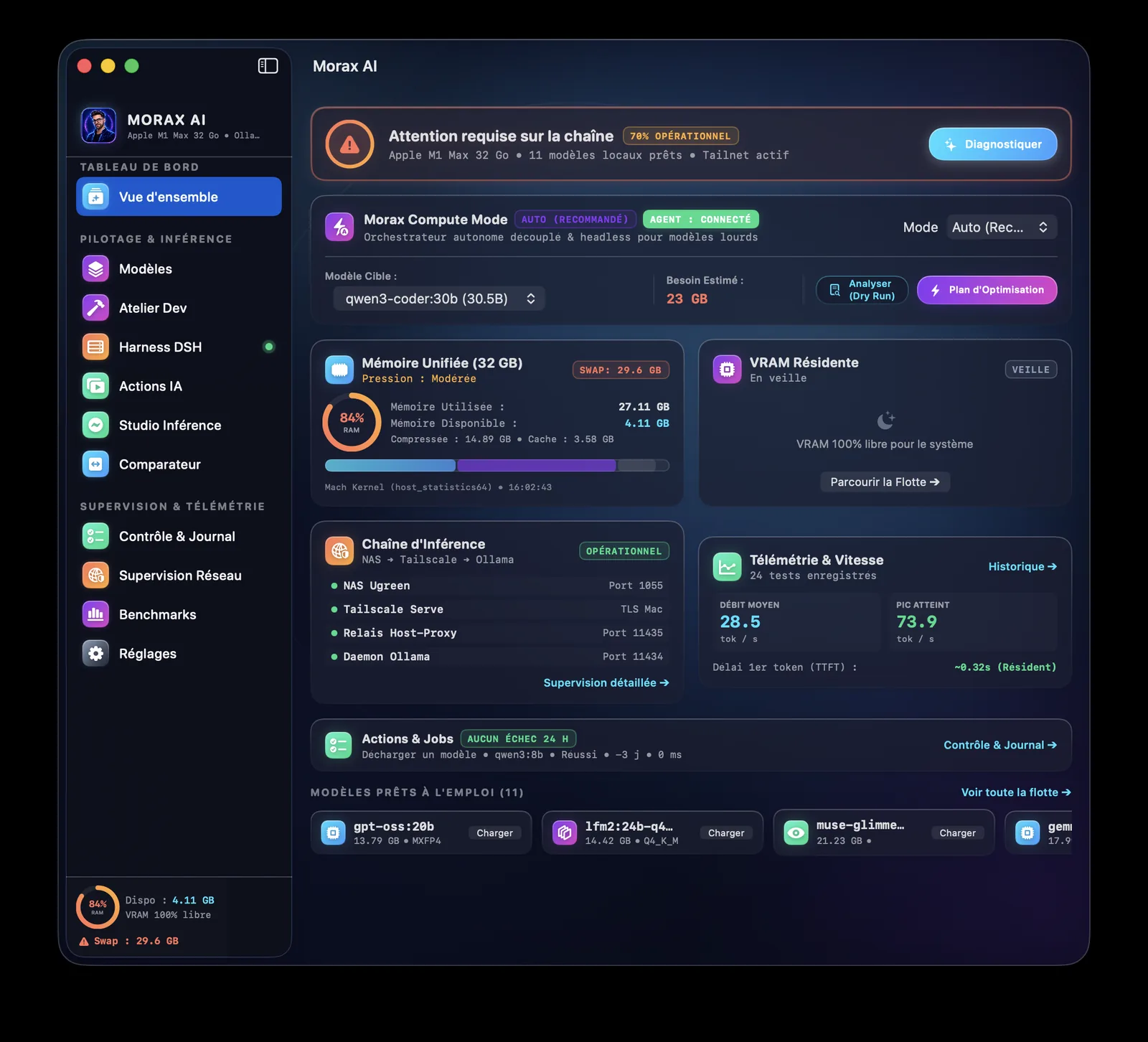
What this product does
Observability
Unified memory, resident VRAM, throughput in tokens per second, and the state of every link in the chain from NAS to Tailscale to relay to daemon, in one cockpit tab.
A catalogue of reusable actions
An action pairs a source (free text, a local file, a shell command, a git diff, a remote NAS file over SSH), a model, a prompt template, and one or more destinations. Built once, run again without re-explaining it.
A mandatory approval gate
Every action carries an effect level. The moment one would reach a third party — an email draft, an outbound message — it stops for a human decision. Nothing crosses that line unattended.
In detail
Nine tabs, one state
Cockpit, Fleet, Actions, Playground, Comparator, Operations, Pipeline, Benchmarks, Settings — one SwiftUI app with a single observable AppState behind all nine, not nine disconnected screens.
State stays on the machine
Model actions, proposals, the operation journal, NAS jobs and benchmarks are plain JSON under Application Support. No database, and this hub reads none of it.
Fleet and comparator
See every installed model, its size and quantisation, load or unload it, and run the same prompt across several models side by side.
Built, not published
scripts/build_app.sh produces the .app, and scripts/package_release.sh is written to sign, notarise and describe a disk image. The only build so far is signed ad hoc, so nothing is published yet — that is the next gap the distribution plan closes.
Not Morax AI Video
That other page describes a face-cam generation service with no code behind it. This one is the opposite: real, running software with no public interface yet. Don't read one page as a status update on the other.
Who it is for
- Triaging a long text or diff
- A saved action reads it, applies the right model and prompt, and writes the result where it's needed — journal entry, file, or clipboard.
- Choosing between two local models
- The same prompt runs on both in the Comparator, side by side, before either is wired into an action.
- An action that could reach someone else
- The gate holds it until Etienne approves it by hand — nothing external is ever sent unattended.
Morax AI
One command post for the models on Etienne's Mac, gated by a human at the moment it matters. Built and running today, still without a public build.
Open Morax AI — indisponible. A release script exists in its repository, but no notarised build is published, and this hub has no access to the local one.